
Everything You Always Wanted to Know About Post-Production Workflows* (*But Were Afraid to Ask)
Production to delivery: Gantt charts, bin systems, why your DIT is unnecessary and other opinions nobody asked for.

This is the second post in a series on production and post production workflows. The first was on distributor deliverables and is here.
Ted Hope asked people in the community to post about best practices to their FilmStack resources tab. This outlines my feature post workflow - physical production to delivery.
I’ve included a Gantt chart template with rough dates and a quick summary of editorial rushes bin organization.
It’s not prescriptive. Every production is different. But this is how I always start looking at structuring a post pipeline. The reasoning matters more than the specific choices - understand the logic, then adapt it to what you’re actually making.
Plus some opinions about DITs, video village, cameras, and VFX pipelines that are obviously correct or really stupid - depending on who’s paying your invoice.
A Post-Production Workflow
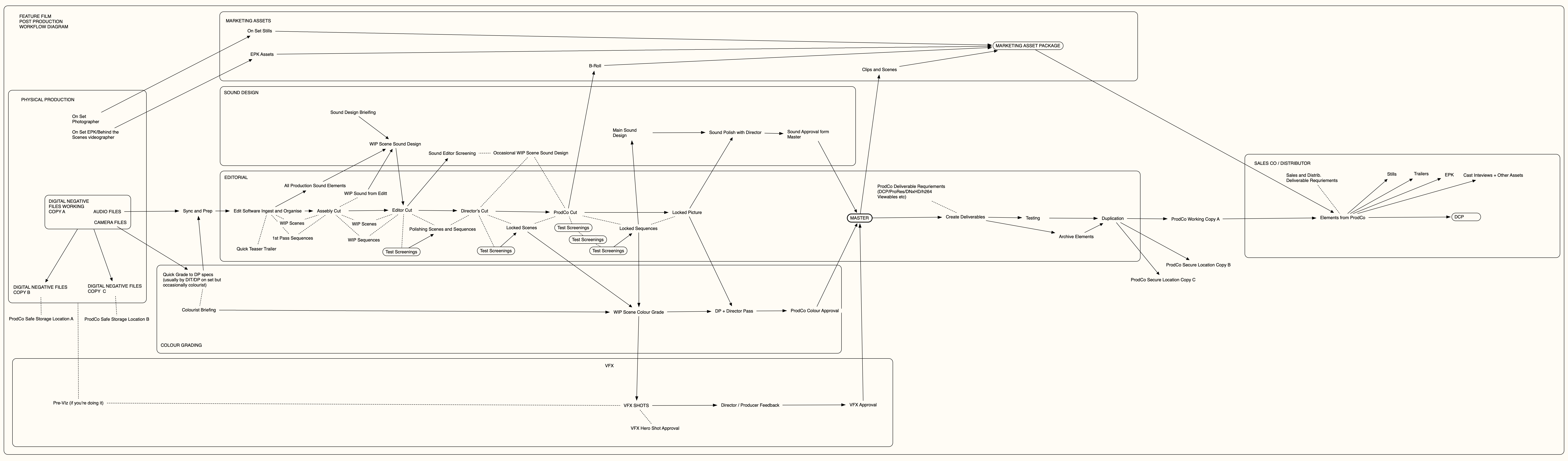
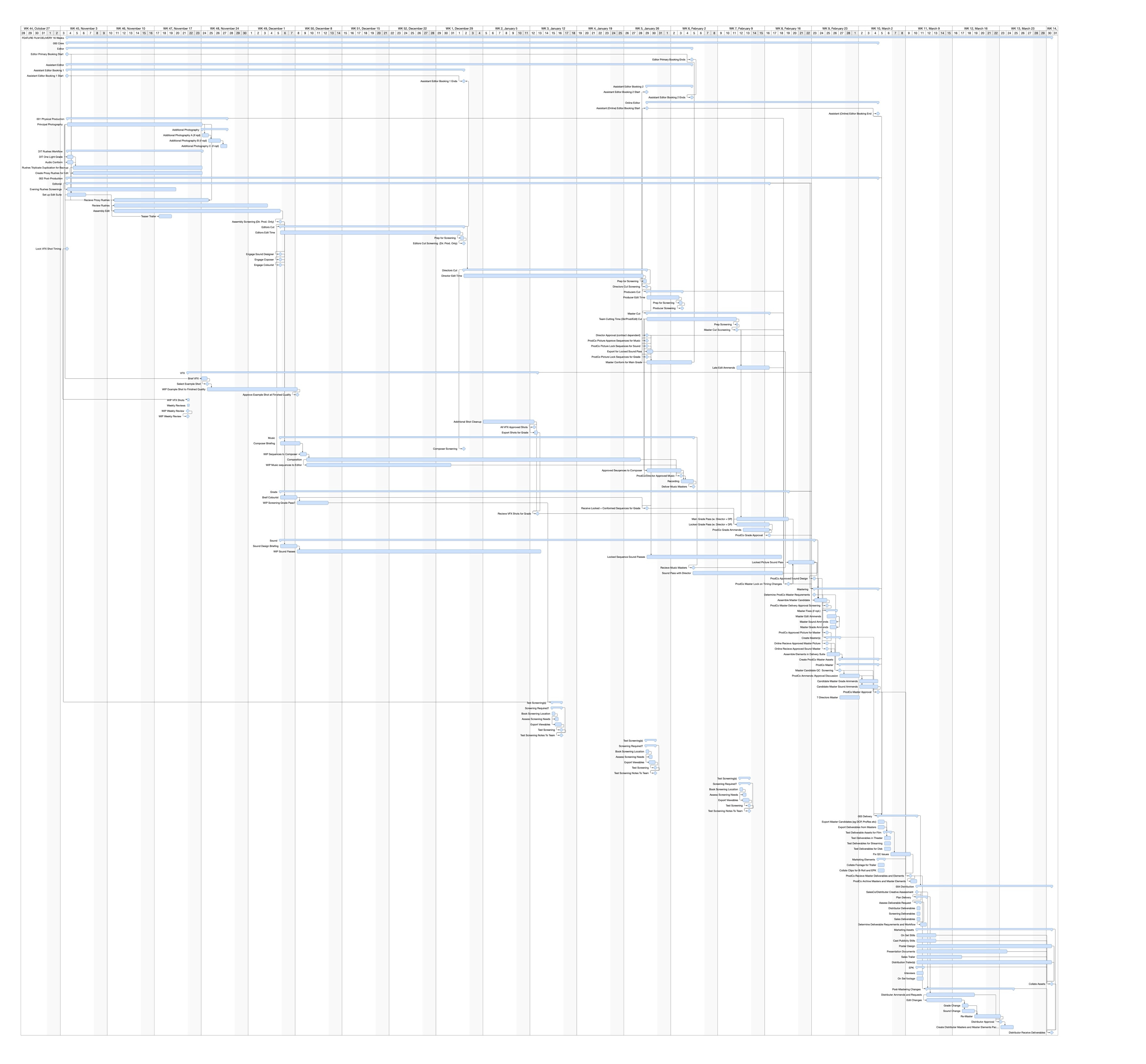
The above diagrams give you an overview of a feature film post-production workflow. Everyone has a different way of doing things, every project is different too - but this is a generic base of how I approach things.
This first diagram was created for a project with a lot of inexperienced people, so everyone was on the same page.
The Gantt chart is from a template I’ve used previously to put a schedule together so I know where I am on a project (I can provide the actual template if you use Merlin Project - if you want it DM me).
This has always more been for my own use than to give out. It’s probably not exhaustive, but it has most things that you need to do to get from camera rushes to master delivery.
Most things are roughly in the right place - but since this is a template this is the default and is obviously intended be altered per project. If something is in an odd place, you’re probably right. I think it’s mostly accurate though - for a 16 week schedule.
Every feature film workflow and every post workflow is slightly different. This is not meant to be exhaustive or prescriptive but a basis for grasping the essential parts.
On the project this was originally designed for we really didn’t have much VFX on the show; a few sky replacements and wire removal clean up. Maybe five or six shots, something like that. So this really doesn’t have any detail in VFX. VFX pipelines are a thing in themselves.
These workflows are not prescriptive, but a launching point for discussion. It is an idealisation of one way of working. I think this is one good way of doing it, but what suits the production you’re working on? What suits your specific needs? What things do you care about, and what things are not relevant? Your answers may be different from mine, and you will then come up with a different process.
I’ll go section by section, box by box and give an explanation of what’s going on.
Physical Production
Starting in physical production, you have the camera and the audio recordings. I’m assuming here that you’re doing a double system process. That is, your audio is recorded to some kind of audio recorder like a Sound Devices MixPre (there’s loads of different products - we were using a MixPre in this case). Then boom mics, lavaliers, all send their data to the MixPre and recorded onto files timecode synced to the camera. The camera then only records a scratch track.
Sometimes you will have the camera getting all the actual audio internally, so you don’t need to worry about sync. This needs to be set up correctly otherwise it’ll be a pain. I actually don’t mind double system. Sync is relatively easy - I mean, it’s a pain in the arse, but it’s not difficult. Relative to the irritations of having extra wires and stuff on the camera, I’ll take double system.
I personally hate big cameras. I hate having to move them. I hate the grip. I hate the gear. I hate the wires. I hate the transmission systems. I hate the extra people. I hate the things that can go wrong. I’d much rather have a smaller simpler camera that makes good images. And then you do audio separately and you fix it put it together in post. That is about as old fashioned as you get. But I like simplicity, speed and fewer people around when shooting, and with modern timecode sync options, double system is easier than ever.
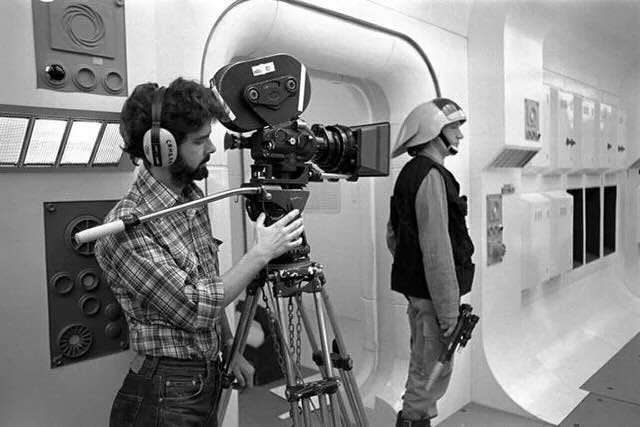
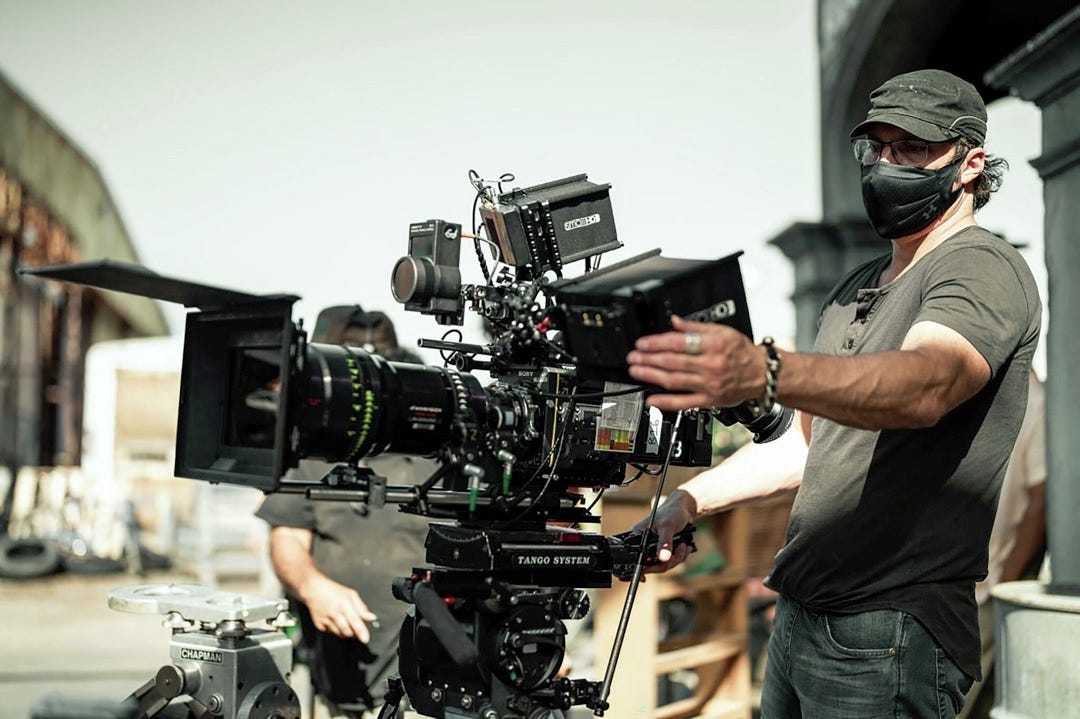
Film isn’t the difference. It’s the “wireless” toys, batteries, and 2(!) monitors.
Either way, in this project we had camera files and audio files separate and you want to duplicate them in triplicate as soon as you’re off camera. Your three copies should be off site in different locations, one should be in a fireproof, theft-proof box.
DITs vs Data Wranglers
Now, maybe I’m old-fashioned, but another thing I don’t particularly like is video village. It slows things down, it means everyone passing through will have an opinion and everyone wants to see the the monitors; people crowd. That said, it can be useful to get everybody off the set that doesn’t need to be there if it’s in another room. It’s also useful for some people to have monitors, but crucially - unless you’re doing ads when the client is there (and that does make a world of difference to keep the client happy), a big DIT video village is going to slow you down at best, and is counterproductive at worst.
There is a difference between DITs and Data Wranglers which is often blurred on smaller sets. A good DIT is a close assistant to the DP who can color grade on set and help manage the digital workflow of the camera. A lot of people on small productions just data wrangle.
So if you are directing your own movie, or you’re directing a movie with producers you trust, and everyone’s happy with each other... Personally, I’d prefer to just have a data wrangler. Or no-one!
On Monsters of Men (it’s in my head because I recently did a deep dive here), a movie with thousands of VFX shots, Mark Toia didn’t even have a data wrangler. He went fully old-school, and shot as if he was using film. He recorded to the camera magazines - the 512 gigabyte RED mini-mags - and just kept them safe until they got to the hotel at night. That’s when they copied them off.
I remember this workflow. Shooting 35mm, you expose the film, and you are just terrified that anything happens to it while you’re sitting in the hotel that night. Toia at least shipped his data back to Australia. The thing is that exposed film in the canister is all you have - all the money you spent is to get that negative… that’s it… just sitting there.
Now, films were made like that until well into the 2000s. Is it best practice now? No, probably not. You are much safer creating triplicate safeties as soon as the camera magazine is done. However, there are reasons to do it. And Mark Toia’s reason, very simple, is that it’s speed. If you are careful, and you keep your magazines safe, and you handle them properly, you just saved yourself money and time on set. You can now move faster, and shoot quicker.
Personally, if you are shooting really fast and light, I’d have a day’s worth of mags and keep exposed ones safe, Mark Toya style. If you’re shooting on a reasonable set that you’re in control of, or maybe you’re actually in a studio, then have a data wrangler.
And if you’re shooting with clients that want to see what the image looks like, and tweak the image right there, have a DIT. DITs are color graders on set, so if you don’t think you need to color grade on set, I’m not entirely sure why you really want an extra body you have to pay for, other than just because you like the workflow. I personally prefer speed and freedom. But horses for courses.
Marketing Assets
On set you’ll have a photographer and possibly an EPK behind-the-scenes videographer. They create stills, BTS video, sometimes cast and crew interviews. This all feeds into the marketing assets package - later used for trailers, press kits, social media.
Dailies and Color
Your audio files and camera files get synced and prepped. The camera files - your digital negatives - get copied to archive drives and shipped somewhere safe. Daily.
As noted I prefer having the colorist in their suite rather than on set. They get the camera files and do a one-light pass - a quick grade. At least they used to. You may not even need this if your LUT is baked in and you’re shooting on set to get the look you want.
On this particular project the show we were working off REC709 as a baseline, and there was definitely grading to be done later because very few scenes looked right straight off 709.
There’s nothing wrong with shooting for a basic 709 LUT as a way of working. I tend to have one that I like and I’m used to so I can see exposure. But I’d rather do proper look development and shoot to a custom LUT if you’re going for some kind of filter look so you can see on set what you’re shooting for. It also stops the director and producers getting too used to a certain look. But the beauty of digital is you have options. You’re not locked into decisions the way you used to be with film, on the flip side, it becomes more political.
So assuming you’re getting log with no baked LUT: the DP gives notes, the colorist (in their office in central London or New York or wherever) does a quick grade on files as they come in. Otherwise your DIT would be doing this on set. Then those files get synced and prepped for editorial.
Editorial
This can start each day during production, or after wrap. Both have advantages. The key thing: the editor should not be on set.
The editor’s main value is fresh eyes - looking at footage without the emotional baggage of being there when it was shot. Put them on set and yes, they can flag missed shots, but they get wrapped up in all the drama. That affects their objectivity, which is exactly what makes them valuable. You’re making them a less valuable asset. Now you can digitally transfer the shots anywhere in the world just about instantly. So keep the editor away from the set, even if they’re cutting as you go, you don’t want your editor to know how long things took or what arguments happened. Distance is key.
It’s useful to cut during production for pickups. It’s also useful (especially for anyone who was on set) to have the more traditional distance of finishing shooting then having a few weeks off then moving into post.
Avid vs Resolve
Files get synced, prepped, ingested into your edit system. Color grading can happen in parallel as files come in.
I used to cut everything in Avid. Now I’d stay in DaVinci Resolve. The full suite of features in Resolve is unbeatable. The round-tripping to Avid isn’t worth the UI advantages anymore.
Yes, Avid has nice UI tweaks for frame-accurate cutting. Faster, and easier to focus on tweaking cuts but you’re finishing in Resolve anyway. Files will get messed up somewhere no matter how careful you are. I don’t think there’s ever been an online/offline proxy workflow that’s 100% smooth. There’s always tweaking and cleanup required in the roundtrip.
Resolve is now good enough that those advantages don’t justify the pain. In addition, you can tweak color as you go because you’ve got the full grading suite right there. And sound, There are too many advantages to just staying in Resolve.
Organization
Ingest and organize your clips. I have a specific system: each day’s rushes gets its own bin, plus a string-out of all rushes from that day. Then there’s a sequence of all rushes from the entire shoot. Then I have a selects bin that is organised by Reel/Sequence with the scenes collected in there.
So it looks something like this:
RUSHES
All Rushes Sequence (all footage in scene order)
By DAY
1103
All Rushes Sequence of 1103
Individual Clips
1104
All Rushes Sequence of 1104
Individual Clips
1105
All Rushes Sequence of 1105
Individual Clips
By SCENE
All Rushes Sequence of Scene 001
All Rushes Sequence of Scene 002
All Rushes Sequence of Scene 003
All Rushes Sequence of Scene 004
...etc
SELECTS
Sequence A
Selects Sequence for Scene 001
Selects Sequence for Scene 002
Selects Sequence for Scene 003
...
Sequence B
Selects Sequence for Scene 009
Selects Sequence for Scene 010
Selects Sequence for Scene 011
...
In the Avid setup, “By Day” is the authoritative originals. All the other bins are duplicated referring back to this clips.
Resolve actually does some of this automatically now in recent versions. I haven’t done a big project since those features came in maybe a month ago, so that string-out sequence might be redundant now. But the principle is the same: a sequence with all the rushes, a sequence with all the selects.
I generally work from my scene sequence and the select sequence. If I need something, I go back to the full string-out of that scene or the full picture to reference/steal bits of other scenes. If it’s not there, I go to the full string-out of the days, or the full string-out of the entire picture. Sometimes you do pickups on different days, so having everything laid out is useful.
The full set of rushes on a timeline is valuable because you can scrub through it. Scrubbing reminds you what you’ve got, helps you memorize the footage. You’re always seeing little bits you think might be useful.
So: string-out for the days, string-out for the scenes, string-out for selects from each scene, string-out for the whole picture. Quick to find anything. Someone asks for a shot, or you remember shooting something on November 25th, or you remember the car park scene - easy to locate.
The sequence of all rushes is organized in script order, not shooting order. Scene one at the beginning, final scene at the end. Everything laid out for the full beginning-to-end structure. Makes finding things simple.
The Rodriguez Teaser
Sometimes I’d do trailers as an editor during assembly cut. Quite often I’d do a teaser trailer so everybody’s really excited while you’re working on it. Gives you extra space.
Robert Rodriguez did this. The first thing he’d do when sitting down for assembly cut is cut a trailer, and then show it to all the people who were working on the film. Everybody’s super excited they just finished production and they’re working on something. It creates some momentum, with freedom and space because everyone’s seen this cool trailer and people are happy. Plus when anyone asks what are you working on you can show them the trailer.
Another really nice thing about doing the trailer: it helps work out what you want the movie to be in your head before you start cutting. Create the trailer that gets you exceited, then you can always go back to it and think: Oh! That’s what I liked about that. The movie’s missing that. I need to bring that out somehow.
You can give yourself a little boost. You may not ultimately be able to make the movie of that trailer, but at least you get a sense, at the beginning, coalescing in your brain, shapes forming in the mist, of what you want the movie to be.
The Assembly Cut
I like starting at the beginning with scene one. Some people start with the easiest or hardest stuff. A big action scene, or an easy dialogue scene to get momentum going. But I want to see how the movie opens. I want to know what it feels like to sit down to watch it. I want the pace-setting moment.
Not that it won’t change radically later. It often will. So there is some redundancy in this way of working. Setting tone is key, and sometimes you don’t know that tone until later. But I like getting that opening sequence established. Making something up front that makes me want to watch the film.
Maybe it’s because more times than not, I’ve found the best moment in the cinema is opening few shots just after the logos. That moment when you are still excited with the possibility that this new film could be a great film. I almost always go into movies with high expectations. I almost always walk out disappointed and I love it when I’m not!
Then I tend to work in order, though sometimes you dart around. Maybe the director or producer wants a specific scene. Maybe you’ve already cut stuff during production.
You’re doing a first pass on everything because you want a viewable cut as soon as possible. No point polishing scenes that might get cut, or polishing them in the wrong direction. Get to your assembly cut where you can sense what works and what doesn’t.
The assembly cut won’t work. That’s fine. But it should be pretty much what the script says. It’s always worth cutting the script exactly just to see what it looks like. Almost inevitably it doesn’t work, but at least you understand the bones and the original intended structure. You can sense what’s working because the film will be its own thing based on what’s been shot.
The best advice about editing I ever got was from Ang Lee. He said:
Editing is like cooking. Your script is the recipe and your making tomato soup. The shoot is going to the supermarket to get the ingredients and discovering they don’t have tomatoes or shallots, only some onions and tomato paste. So you make do and get what you can that will make it work, maybe you buy some extra cinnamon. Then you get into the edit suite - that’s you in the kitchen. You cook with the ingredients you have, not the ingredients you were supposed to get.
That’s exactly it.
But first you want to see what the recipe looks like with what you’ve got. Even if you know it’s going to be rubbish. Like cooking - if I see a recipe for the first time, I don’t mess with it. I cook it, taste it, then make decisions. That’s the assembly cut.
Usually producers come watch it, certainly the director watches it and it sets the tone for how much work everyone has to do.
Sound Design and Screenings
Production sound elements go to sound design briefings as the editor works. At some point around now you brief the sound designer. Those audio elements go to sound.
You’re probably not sending work-in-progress scenes to audio except as reference. They’re not going to work on it until things are closer to locked. For the assembly cut and certainly the editor’s cut, you want better sound design. Not finished, but cleaned up. As an editor you’re doing some of this yourself anyway, but more hands on deck is useful. A quick mix for a screening cut (maybe not the assembly since it’s very rough) is always good if you can afford it.
You should not have audio bumps that knock people off in any cut except maybe the assembly. There’s no excuse for not doing clean L cuts, fading sounds and mixing dialogue with dissolves at the very least. If you don’t have clean sound it distracts people and makes them think things don’t work when they do.
Even experienced people get subconsciously upset by audio bumps, crackles, dropouts. Vanishingly few people can ignore it - perhaps a few grizzled editors being the exception. For screenings you don’t want any of that. If you’re doing it, you’re not giving your cut the best showing.
For proper test screenings you need a sound mix done. Whether you do it yourself or get a sound designer depends on your budget. Bad sound in a screening will kill your film.
Working with the Director
If I’m cutting for someone else I like doing an assembly on my own, then a bit of time for an editor’s cut. I don’t like having the director in from day one because they’re still on set. What they felt on set is in their head when they watch rushes.
That applies to me as an editor too, but I’ve got experience doing both and have some ability to contain it. Even then there is still a risk of contamination. Which is why it’s good to have a break. Finish production, disappear for two weeks. Don’t think about the movie. Holiday. Then come back and look at what you’ve got. Hard to get it out of your head but definitely good to clear your brain.
If you come straight from set to edit room you’re risking suboptimal results.
Actually, giving the editor a few weeks to do assembly and editor’s cut before you return as director is pretty good. You go on holiday, come back, look at your film. It’ll be a mess and you’ll want to throw up, but you can see where it works, where it doesn’t, what the editor’s done.
It won’t be what you hoped, in an ideal world it’ll be better than you hoped. In reality maybe two out of three don’t work, and one scene the editor did something interesting you didn’t realize would work like that, but it doesn’t quite work either.
All of this depends on your editor because you need to know what you’re getting. There are editors that are builders and editors that are creative. Builders follow slot A into tab B, follow the script and push buttons. Creative editors will take your script and footage, rip it apart, put it back together almost unrecognizably different from what you expected. You always want creative editors, even when it causes fights.
The key thing is that a great editors version is more likely the better version because they looked at what you’ve got, not what you wanted to get. That said, the editor tends to focus on the detail, the director should have more of a sense of the whole. Not all editors are great editors.
That’s the trick as a director cutting your own stuff - be schizophrenic at each stage. Kubrick said: *When directing, I look at the script and think, who’s the idiot that wrote that. I get to post and think, who’s the idiot that shot this? How am I going to cut this mess?*
You’ve got to be able to look coldly at images as material for collage, not jigsaw pieces.
Locking Picture
Working with the director, polishing scenes and sequences, getting them into shape. You may send out locked scenes and sequences for sound design. I usually work by reel or scene and lock scenes or sequences, then hand them to sound.
Once you’ve locked that sequence, you can do proper sound design. If you’re constantly changing picture, the sound design is constantly changing - massive pain. Lock picture before going to sound properly. Obviously as an editor you can cut sound as you go, but for the proper mix, proper outputs, proper polish - you need locked picture.
VFX
If you’re doing VFX, at this point - and I personally think this is best practice, though it is a rare practise - you do what Mark Toya did. And what they did on The Creator. You lock picture and you have your frame-accurate VFX shots, then send them to VFX.
Traditionally VFX starts before physical production. You’ve got previs, shots done in previs, move to VFX pipeline. But stuff changes. Scripts change, pictures change, ideas change, stuff happens on set, new ideas. All of a sudden you’re changing VFX shots constantly.
If you lock your cut, you have a specific number of VFX shots. You’re not shifting goalposts every week, which is infuriating for VFX artists and gives you suboptimal VFX.
Locked picture means you can spend more time, fewer people, and less money getting better VFX. Small teams work better. Get the VFX people own their shots, not farm them out to 20 different places. Have them own their work. Things are locked. You’re not constantly changing camera angles and moving stuff around. So they can just polish without fear it’s wasted effort.
Locked picture, locked edit. There’s a big advantage to working like that with VFX.
Director’s Cut and Producer’s Cut
So the director’s cut - you’ve polished the scenes, done some testing, locked the scenes, the director’s happy. You do more screenings, maybe you’ve been test screening throughout. Then the producers come in, presumably because the director doesn’t have final cut. They look at the director’s cut and say what needs changing. Politics about that. Who thinks what is better.
And of course, in an ideal world these stages are separate, but you know the producers and their friends are probably going to want to be in the edit from the start.
We all know what cut disagreements look like. Usually producers have final cut. Mostly producers take the director’s cut, make changes. Usually with the director there, sometimes not, depends on the relationship, lock picture, send everything to final polish in grade and audio. Hopefully director’s still in good relationship with them so they get to do the color grading and sound on the final locked picture.
But all of this is a movable feast. Different people work differently. This is one example of how it can work. At some point the picture gets locked for sound and colour.
Color Grading
Once you’ve locked scenes and picture, much like sound, you can start locking your color grade. With locked sequences you can do work-in-progress grades. Usually I’d do those in Resolve as we go if needed. Try to cut the scene first. Don’t color grade stuff that’s not locked. But you can tweak as you go, so long as you’re not spending too much time. Scene level, not shot level.
As you grade, hopefully your scene has a look - that’s your look for the scene. Maybe tweak it a bit, but don’t go into shots and do heavy work until you finish the edit. Edit is the important bit. Lock those scenes and lock that picture before you really get into it.
Once you get locked picture, do a sound design polish. Director probably does a sound design polish with the sound editor. Director and DP go do a color grade pass on locked picture.
There is much argument about DPs and directors getting into color grades. DPs often feel locked out. Sometimes that’s true, but a lot is about time, money, organization rather than deliberately cutting them out. Producers don’t want to spend money on people sitting in an expensive colour suite. Giving control to a good DP to help in the polish is money well spent, but not everyone thinks so. Especially when politics comes into it.
When you’re at that point the producers are asking: if I spend another thousand pounds for a few more hours on the grade, does this sell another thousand tickets? An interesting question that’s hard to answer.
Look at the Blade Runner cuts. The restored “Final Cut” Ridley Scott did - with a thousand small changes you can barely identify. But it’s a much better film than the original studio cut, and better than the Director’s Cut. Restoration cleaning things up, tweaking, nipping and tucking. Subtly, not like George Lucas on Star Wars. If you’re in that situation and you own the distribution - then in the color grade, yes those small tweaks matter, you want to get the best picture you can. Because it’s not about selling a thousand tickets up front, it’s about selling them on the long tail when people recommend the film to their friends.
Mastering and Delivery
Once you’ve got sound approval on your master picture and the production company has approved the grade, bring it back into Resolve and create your master. You’ll send clips and scenes to the marketing asset package - now nicely graded and sound designed, unlike the earlier bits you sent.
Production company wants deliverable requirements: DCP, ProRes master or some semi-lossless master file. ProRes or DNxHR. Maybe H.265 or H.264 for viewing. Create your deliverables.
At this point you might go into more testing and need to make changes. That might loop back. It gets fuzzy at the end because you really should be doing testing before locking the master. But sometimes you unlock the master and tweak at the insistence of the sale company or the distributor. That’s where it gets expensive - you’ve done a bunch of stuff, and anytime you unlock that master you’re costing money because you have to redo work.
Usually the arguments go something like:
BUYER: We won’t accept the film unless you fix that yellow jumper. Cut that shot or turn it green.
PRODUCER: Sure. We can do that but it’ll cost £10k and take a week.
BUYER: This is your cost. Fix it.
PRODUCER: No. In the agreement the distributor pays at least 50%. Where did the note come from?
BUYER: OK. We’ll accept the film. My mum was at the screening and she hates yellow jumpers.
Once you’re creating deliverables, you’re also archiving everything. Triplicate on master delivery drives, ideally single package, exactly as was sent out.
The marketing asset package and your master package, deliverable package goes to the sales/distribution company (or yourself). They will use all those to create whatever they need. You may also be creating these things. Depends how it works, but if you’ve created a ProRes HQ 4444 (or other semi-lossless) master with sound, laid out properly, just about everything can be created from that. DCPs, trailers, clips, everything is downstream of that master file.
And if you have a master file. Well done!
That’s your movie!
If you have any questions - ask me in the comments and I can clarify!
There is also a good resource from frame.io covering post production workflow, but I find it gets weighed down taking a lot of time to examine complicated but minor parts of the process. That is good for reference, but can be confusing if you don’t already know what’s going on.
Great stuff, both ideas I’ve seen and things I’ve never thought of.